Basic Trial
This page explains how to make a simple, manual, test to send a payload and so to prove that the server is able to work.
Anonymous or Authentified?
With a default installation in a development environment, you can choose to stay an anonymous user, as it has a role giving access to all API actions.
Otherwise, if access restrictions are set, you may need to be identified as an authentified user, with as least the permission to access the action of your decoder.
One easy way to satisfy this constraint is to use an API Key with the default user made available by the plugin.
Here is an example of how to create the key with the Admin Console.

The interesting part to get in the response, for the next step, is the value under the token key.
Send a Payload
The screenshot hereunder shows a way to send something to the server with the Developer Tools of a navigator (Firefox in this case).
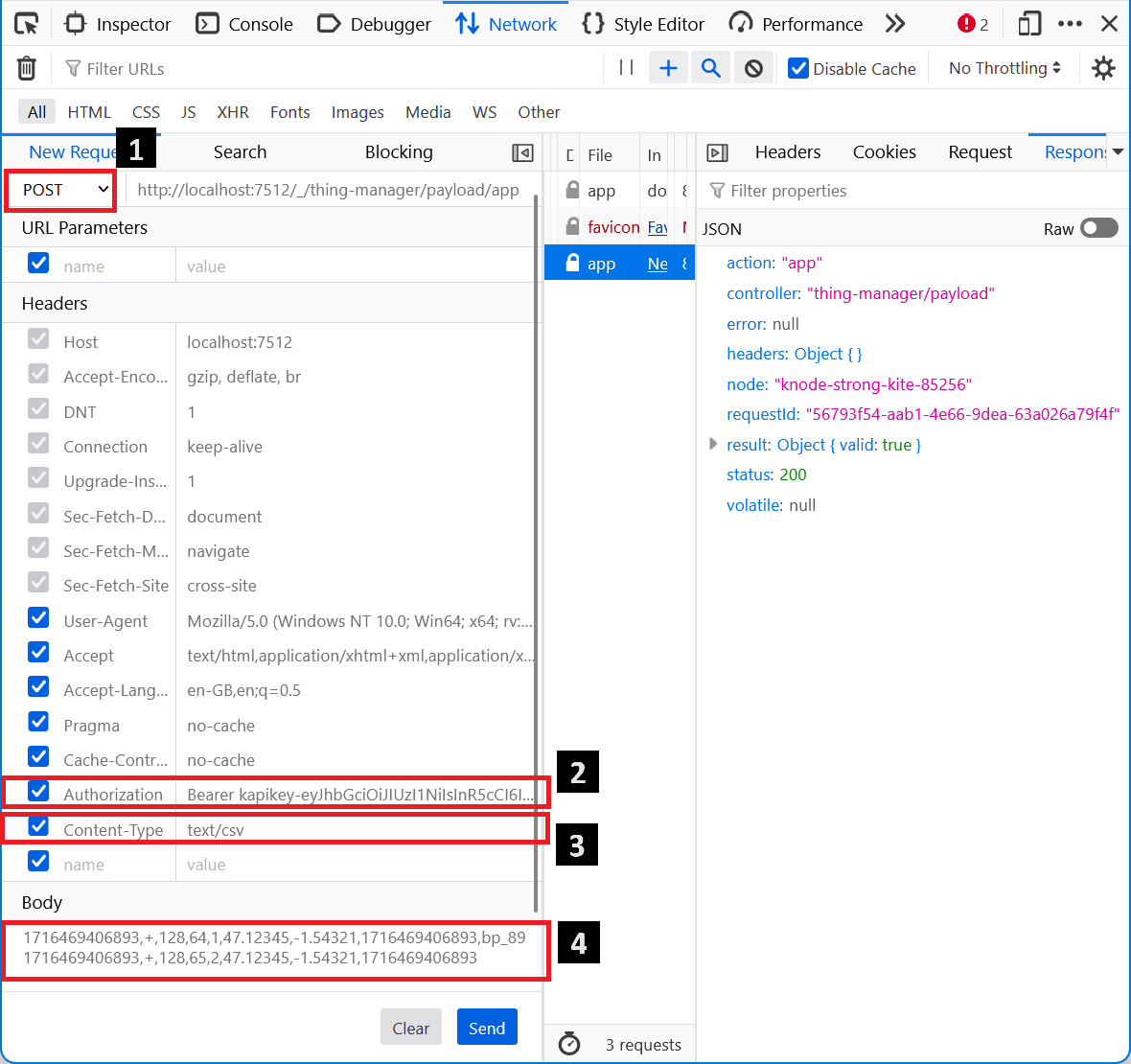
1: Select the POST method, instead of the proposed GET.
2: If you need to be authentified, set the relevant header, with the API Key created on the previous step.
3: If your decoder is designed to accept a format other than json, advertise the content type with a header.
4: Put some data, compliant with your decoder capabilities.